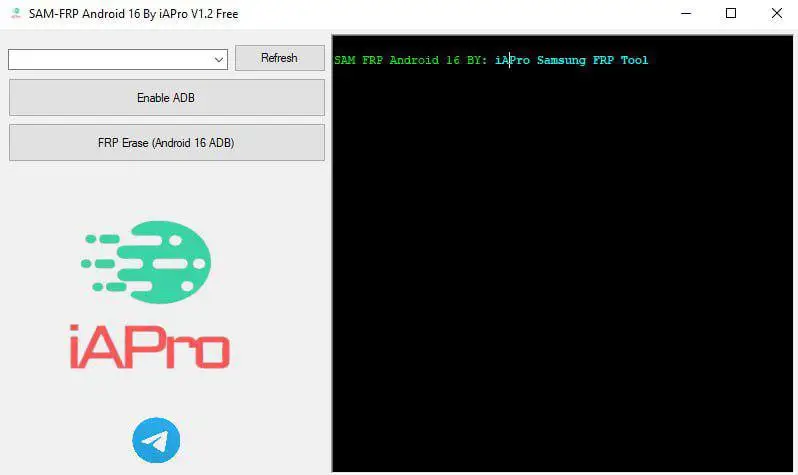
This tool is made for Samsung Android 16 devices to remove FRP lock using a new working loophole. It allows USB Debugging to turn ON even when the phone is still FRP locked. With this method, FRP can be removed in just one click through MTP mode.
The tool works on the latest Android 16 security patch, including the November update, and also supports older patches. There is no need to flash firmware, download files, or follow risky steps. Just connect the phone and run the tool.
It is very useful for users who forgot their Google account and for mobile repair technicians who deal with FRP issues daily. The process is fast, simple, and works smoothly when used correctly.
How to Use SAM-FRP Android 16 Tool
This method is very easy and does not need flashing or extra files.
Step 1: Power On the Phone
- Turn ON the Samsung phone and keep it on the FRP lock screen.
Step 2: Connect to PC
- Use a USB cable to connect the phone to your computer.
- The phone should connect in MTP mode.
Step 3: Open the Tool
- Open SAM-FRP Android 16 Tool on your PC.
Step 4: Enable ADB
- Click on Enable ADB and wait a few seconds.
- The tool will automatically activate ADB.
Step 5: Remove FRP
- Now click FRP Erase.
- Wait until the process completes.
Step 6: Reboot
- The phone will reboot automatically.
- After restart, FRP will be removed and the phone will be ready to use.
Important Note
Use this method only for your own phone or with customer permission.
This tool is made for repair and legal use only.
Samsung Android 16 FRP Tool Download Link
Sam Android 16 FRP Tool Download 👉 Click Here
Premium Unlock Tool 👉 BFT Best Flash Tool by BossV V1.8 Download
Leave a Comment