Disclaimer: All tools and files shared here are for educational purposes only. Scan all files before use. By downloading anything from this site, you agree to use it at your own risk. We are not responsible for any damage or issues.
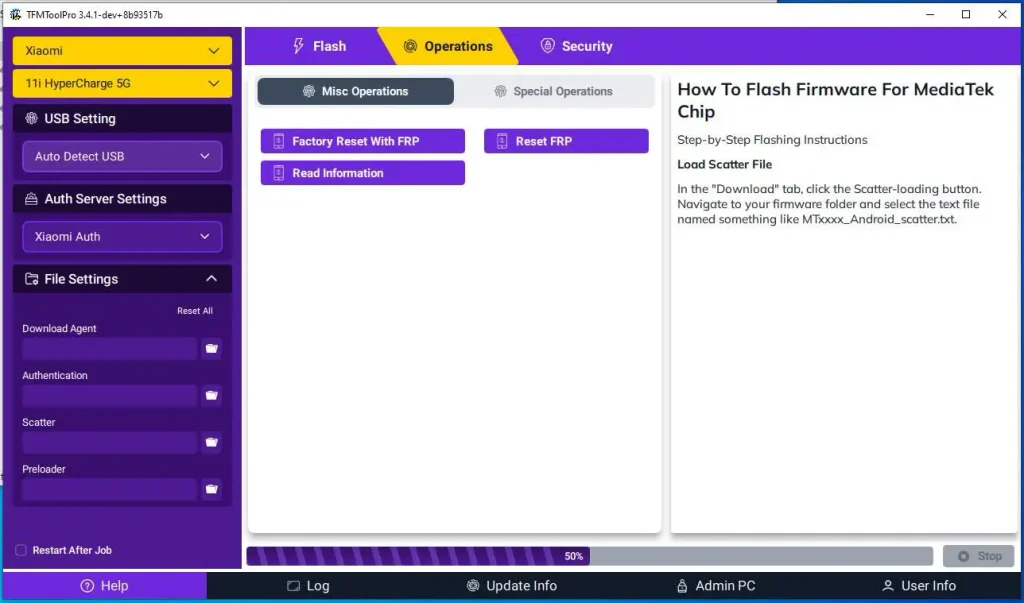
TFMTool Pro is a Windows-based mobile servicing tool currently available in beta. It includes Xiaomi flashing, Partition Manager, Fastboot tools, FRP options, and Xiaomi Auth settings.
The tool also offers a free license with access to selected services. Supported services include Xiaomi, Vivo, and Transsion Auth. It also provides re-flash and re-EDL options for supported devices without extra credits in certain cases.
TFM Tool Pro Beta Features
- Xiaomi device support
- Flash firmware
- Flasher section
- Partition Manager
- Search Partition
- Show All partitions
- Erase partition
- Write partition
- Read partition
- Reboot device
- Load Partition
- Factory Reset With FRP
- Reset FRP
- Read Information
- Set EDL Active Slot
- Fastboot Set Active Slot
- Fastboot to EDL
- Fastboot Reboot
- Fastboot ReadInfo
- Remove FRP Assistant option
- Read Information Assistant option
- Xiaomi Auth Server
- Download Agent support
- Single Program support
- Multi Program support
- Operation log panel
- Reset All option
- Restart After Job option
How To Install TFM Tool Pro Beta
- Download the latest TFM Tool Pro installer.
- Run the setup file as Administrator.
- Follow the setup wizard to complete the installation.
- Open TFM Tool Pro after installation.
- Create a TFMTool account if you do not have one.
- Verify your email with the OTP.
- Select the Free License option.
- Activate the license from your account dashboard.
- Enter your username/email and password in the tool.
- Sign in and open the main interface.
- Select your supported brand and model, then choose the required service option.
Download Link
Download TFM Tool Pro 3.4.1 Beta Click Here
Leave a Comment