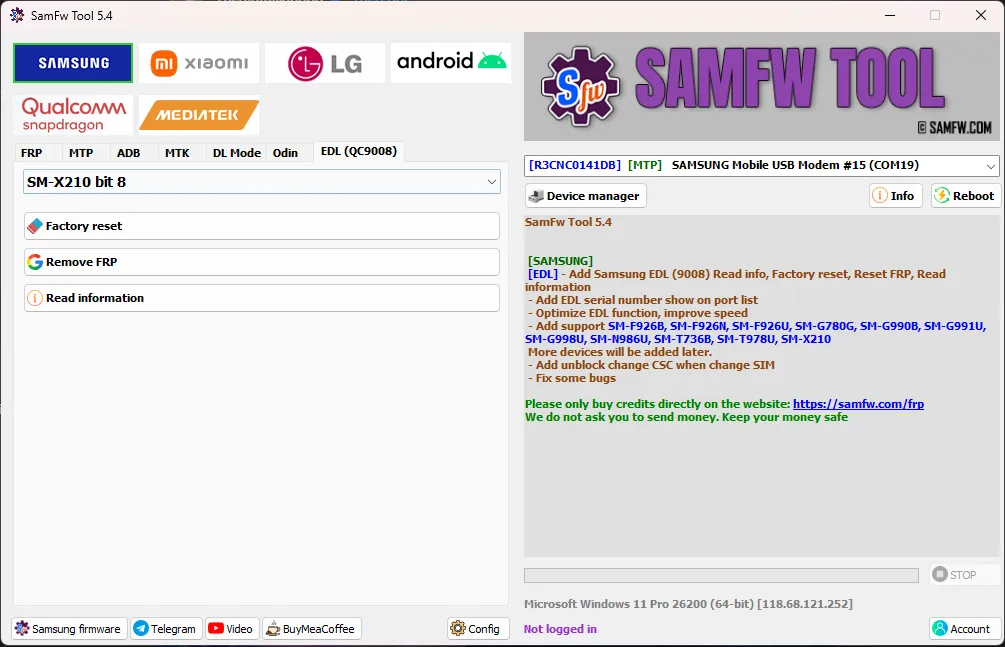
SamFw FRP Tool 5.4 comes with solid improvements and smoother performance. The tool now fully supports Android 16 FRP, making it ready for the newest Samsung devices. It also adds a useful feature to check battery health on OneUI 8+, helping technicians quickly diagnose device conditions.
This update fixes the Windows 7 issue and removes several small bugs, resulting in better speed, stability, and overall performance. With these enhancements, SamFw FRP Tool 5.0 remains a reliable and efficient solution for Samsung FRP bypass and device servicing.
What’s New in SamFw Tool 5.4
[SAMSUNG]
[EDL] – Add Samsung EDL (9008) Read info, Factory reset, Reset FRP, Read information
- Add EDL serial number show on port list
- Optimize EDL function, improve speed
- Add support SM-F926B, SM-F926N, SM-F926U, SM-G780G, SM-G990B, SM-G991U, SM-G998U, SM-N986U, SM-T736B, SM-T978U, SM-X210
More devices will be added later. - Add unblock change CSC when change SIM
- Fix some bugs
SamFw Tool 5.4 Features
Samsung
- Test mode (#0#)
- Remove FRP
- Remove FRP new security
- Factory reset
- Disable Knox
- Disable Factory mode
- MTP mode
- Enable secret code for Verizon
- ADB mode
- Change CSC
- Remove Samsung account
- Enable Toggle mobile data
- Change CSC root mode
- Download mode
- Exit Download mode
- Soft brick Fix
- FRP Android 5/6
- Odin Flash
- Save recent flash files
- Auto-detect file and select slot
- Auto-extract for ZIP file
- Ignore MD5 checksum
- Check Driver signature enforcement status
- Disable/Enable Driver signature enforcement
- Install Samsung USB driver
- Install VC++ 2015
Xiaomi
- ADB
- Bypass Micloud Android 8.1
- Enable Diag [ROOT]
- Fastboot
- Remove FRP
- Sideload
- Factory reset
- Reset MiCloud
- [QUALCOMM] Bypass Micloud clock (Anti relock)
- [QUALCOMM] Remove bypass Micloud clock (Anti relock)
- Read offline Micloud information
- EDL 9008
- Reset FRP
LG
- MTP
- Factory reset
- EDL (Support LG G7, G8, G8X, G8S, V30, V40, V50, V50S, Q6, G5, G6, V20, V35, V60)
- Remove FRP
- LG UP
- Flash LG KDZ
Android
- ADB
- Battery information
- Disable/Enable OTA Update
- Set language
- Factory reset
- Hide Developer options
- FRP
- Open Browser (FRP)
- APP Manager
- ROOT
Qualcomm
- EDL 9008 Partitions manager (Read/Write/Erase)
- EDL 9008 Reset FRP, Factory reset, Erase userdata
SamFw Tool 5.4 Download Link
SamFw Tool 5.4 Download 👉 Click Here
Watch This Video for the Installation Guide 👇
Leave a Comment