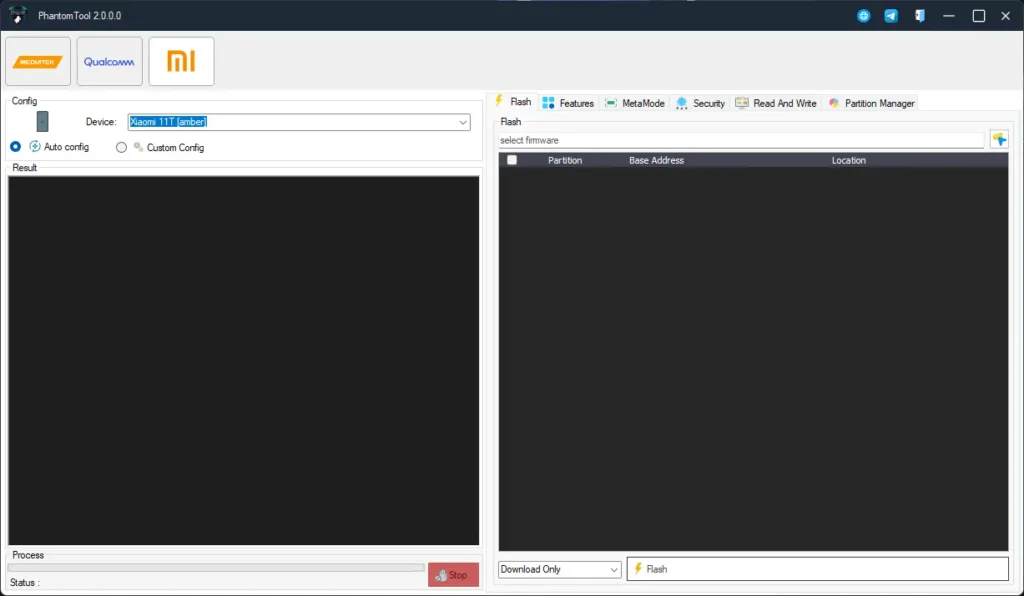
PhantomTool has released its latest update, version 2.0.0.0, and it brings major improvements for mobile technicians and phone repair experts. The new update feels smoother, faster, and much more stable. Many older functions have been rebuilt, device support has expanded, and overall performance is noticeably better.
This version is especially useful for those who work on Qualcomm and MediaTek (MTK) devices. Flashing, repairing, unlocking, and servicing tasks now run more efficiently with fewer errors.
One of the biggest highlights of this update is that the developer has officially made the tool completely free until the next update. You can create a new account or log in with your existing account and enjoy all premium features without paying anything.
If you work with phone repair tools and want a reliable all-in-one solution, PhantomTool v2.0.0.0 is definitely worth trying.
PhantomTool v2.0.0.0 Features
The biggest highlight is the new full support for Xiaomi tablets. IMEI repair, CPID functions, and Meta mode operations are now fully upgraded and work more smoothly than before.
New additions:
- Xiaomi Tab full support
- Better IMEI repair functions
- CPID read and write
- Faster Meta mode work
- Manual authorization option
- Weekly fixes and exploits
- Support increased to around 1800+ models
Qualcomm functions include:
- Auto loader detection (DA / Firehose)
- Sahara Protocol V3 support
- Full partition backup and flash
- EXT4 firmware flashing
- FRP bypass for all security patches
- Mi Account removal
- EFS read, write, and repair
- Detailed partition information
MTK functions:
- Protocol V4, V5, V6 support
- Flash all types of firmware
- RPMB operations
- Bootloader unlock
- SLA / DAA bypass
- FRP reset or format
- NVDATA read, write, erase
- OEM info read/write
- RAW firmware read/write
- GPT read/write
- Preloader read/write
- Advanced partition management
Device Control & Safety Features
The tool also adds a few quality-of-life improvements:
- One-click operations
- Auto device detection
- Safe Mode
- Live progress indicator
- Error recovery
- Full operation logs
How to Log In for Free (Official Method)
Good news — the tool currently requires no paid activation.
Just follow these steps:
- Install the tool using the normal setup.
- Open it after installation.
- Create a new account or log in with your old one.
That’s all. No license, no activation — you can use all features for free until the developer changes the system.
PhantomTool v2.0.0.0 Download Link
Premium FREE Unlock Tool 👉 BFT Best Flash Tool by BossV V1.8 Download
Leave a Comment